



.jpg?width=40&height=40&name=Honor_Headshot%20(1).jpg)
Summary:
Assessing Copilot readiness means checking a client's Microsoft 365 data organization, governance, access controls, security posture and licensing position before recommending a rollout, not after. This guide breaks the assessment into six factors MSPs can work through with a client, plus five diagnostic questions to ask before scoping the work. The single most useful takeaway: Copilot surfaces whatever a user can already access, so fixing permissions and sensitivity labels has to happen before rollout, not as cleanup afterward.
|
What you'll Learn |
|
|
Benefits for MSPs |
|
|
Required Next Steps |
|
Clients are asking about Microsoft 365 Copilot, and MSPs are expected to have an answer that goes beyond "yes, we can turn that on." The licensing conversation is the easy part. The harder question is whether the tenant underneath it is actually ready.
Copilot works within whatever access a user already has across email, Teams, SharePoint and OneDrive. If permissions are loose or sensitivity labels are missing, Copilot does not create new risk so much as it makes existing risk visible to anyone with a prompt box. Turn it on in a messy tenant and you can expose sensitive files or salary data in seconds. Turn it on in an underused tenant and it has too little to draw on to be worth the license.
A Copilot readiness assessment gives MSPs a structured way to check both problems before committing to a rollout. The six factors below, plus the questions to ask a client directly, turn a subjective "is this client ready" call into something you can walk through and document.
- Microsoft 365 Copilot is sold as an add-on license on top of an eligible base plan: Business Basic, Business Standard, Business Premium, Microsoft 365 Apps for business, or Microsoft 365 E3, E5 and E7, plus equivalent Office 365 and Teams plans.
- No minimum seat purchase applies to the Copilot add-on; the original 300-seat threshold was removed in 2024.
- A user's primary mailbox must be in Exchange Online for Microsoft 365 Copilot to work; on-premises and hybrid mailboxes are not supported.
- Copilot Chat is free with eligible Microsoft 365 plans and needs no add-on license, but it only grounds answers on the web and content the user supplies; a tenant's own emails, files, chats and meetings are only pulled in through the paid Microsoft 365 Copilot add-on.
- Microsoft 365 Business Premium and the wider Business plan family (Basic, Standard, Premium) are capped at a combined 300 seats per tenant.
- In Microsoft's 2023 Work Trend Index, 70% of employees said they would delegate as much work as possible to AI to lighten their workload, which is the demand side of the case MSPs are being asked to meet.
- inforcer's Copilot readiness assessment scores technical readiness across identity and access, sensitivity labels and DLP policy coverage, alongside adoption and security posture, in one exportable report.
Scope and Limitation Statement
On Copilot readiness specifically, inforcer runs an automated audit of a connected Microsoft 365 tenant across adoption, security posture, data governance and technical readiness, covering identity and access, sensitivity labels and DLP policy coverage. It flags power users and department-level usage and exports a readiness score, technical recommendations and a business case with an ROI overview. It does not purchase, assign or configure Copilot licenses, and it does not carry out the governance or access-control remediation work the report recommends.
Why assess Copilot readiness?
It’s no secret that AI usage is on the rise. In fact, according to a report from Microsoft, 70% of employees now say they would delegate as much work as possible to AI if it meant lightening their workload.
As a strategic IT partner, you need to help your customers use AI to their advantage, ensuring they are configuring Copilot correctly, using it securely, and have a mature enough data environment to get the most out of the tool.
Combat security risks
Copilot comes with inherent security risks as it connects to an organization's internal data and draws upon it to form the basis for its answers. This means it can sift through information contained in user documents, emails, meetings, chats, and calendars to create the advanced responses that users value so much.
Without proper data access controls in place, anyone within the company could access sensitive data. You could potentially find out details contained in confidential emails, access summaries of closed meetings, or even find out your colleague’s salaries.
If the company then experienced a security breach, this data could be exploited by cyber criminals.
You need to assess Copilot readiness to ensure that your customers have the correct security posture, data governance, and access controls in place to roll out Copilot safely.
Enhance effectiveness
As Copilot draws on data from Microsoft 365, if your customers are not using much of their 365 environment, Copilot might not have enough data to draw answers from. If this is the case, Copilot won’t be a particularly useful tool for them.
Auditing your customers’ Microsoft 365 environment is a major step in assessing their Copilot readiness. You can suggest ways that they can get more out of their Microsoft 365 licensing and highlight different tools they can use to achieve the business outcomes they truly care about. For example, they could use SharePoint to organise and share files easily, use Loop to collaborate seamlessly on projects, or use Teams to host online meetings and communicate with different areas of the business.
6 factors to consider in your Copilot readiness assessment
When getting your customers ready for Copilot, take them through the following steps to ensure they are truly prepared for rollout.
1. Organize Microsoft 365 data
Ensure accurate, up to date responses from Copilot by centralizing, organizing, and structuring your customers’ data.
- Audit their data landscape
- Migrate relevant content to Microsoft 365
- Identify and remove outdated or inaccurate data
- Properly classify and label data
2. Establish data governance
Define clear purposes, rules, and role assignments for each workspace within Microsoft 365 to prevent unauthorized actions occurring or sensitive data being shared.
- Separate data into different Microsoft 365 workspaces based on data type and sensitivity
- Configure site access to control who has access to workspaces
- Automate regular data back-ups to protect against accidental or malicious deletion
3. Strengthen data access
Strengthen access controls and review permissions to prevent sensitive data being shared with unauthorized users.
- Audit company data permissions and identify and remediate any existing issues
- Apply sensitivity labels and Conditional Access policies
4. Secure the Microsoft 365 environment
Ensure your customers’ have a strong security posture across their Microsoft 365 environment to prevent data breaches.
- Conduct a risk assessment
- Audit Microsoft 365 security policies
- Continuously monitor for configuration drift and security concerns
5. Consider licensing strategies
Discuss how many Copilot licenses your customers want to purchase and how they want to use AI in their company.
- Run a user usage report to determine the Microsoft 365 power users who will directly benefit from Copilot
- Assign licenses to this group of users
- Consider upgrading licenses to Business Premium to benefit from the additional security and productivity benefits which support Copilot
6. Prepare a Copilot pilot
Help your customers to conduct a pilot test before rolling out Copilot across their company to assess effectiveness, ensure security, and collate feedback.
- Elect Copilot champions within the business
- Review a list of sites that Copilot should only see during the pilot
- Design customer specific prompts to test potential data leakage of sensitive information
5 questions to ask to assess Copilot readiness
You shouldn’t try and force Copilot adoption as quickly as possible across your customer base. You need to be strategic, and guide your customers based on their specific needs and AI maturity levels.
Struggling to get started? Ask the following questions to open the conversation about Copilot readiness:
- How consistently do you use the Microsoft 365 stack?
- How do you currently structure and secure your Microsoft 365 data?
- Do you already know how you want to use AI in your business?
- Do you have a plan for Copilot adoption, uptake, and usage?
- Is your team ready to adapt to change?
Asking these questions will help to reveal potential issues and open wider conversations about your customers’ security posture, data governance, and overall Microsoft 365 strategy. You can then help to add value across your customers’ entire IT infrastructure, positioning yourself as a truly strategic and trusted partner – rather than someone just trying to push the latest trend.
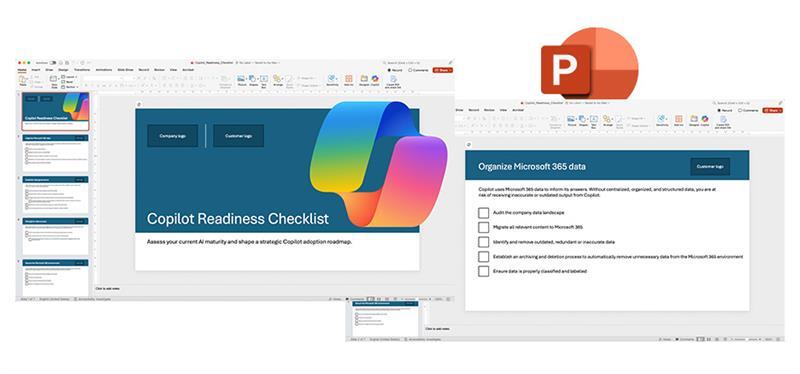
Download our Copilot readiness checklist
Want to start having Copilot conversations with your customers? Download our templated Copilot readiness checklist to assess your customers’ AI maturity levels and help guide their next steps for Copilot adoption.
FAQs
What is a Copilot readiness assessment?
A Copilot readiness assessment checks whether a Microsoft 365 tenant has the data structure, security posture, governance and licensing in place before Copilot is switched on. It typically covers data organization, access controls, security configuration and licensing strategy, then flags where sensitive content could be exposed if Copilot goes live before those controls are fixed.
Is Microsoft 365 Copilot secure by default?
No, Copilot is not secure by default. It works within whatever access a user already has across email, chats, meetings and files, so if permissions or sensitivity labels are misconfigured, Copilot can surface content that user should never have seen, including confidential emails or salary details. Fix access controls before rollout, not after.
What Microsoft 365 license do you need for Copilot?
Microsoft 365 Copilot is sold as an add-on license on top of an eligible base subscription, including Business Basic, Business Standard, Business Premium, Microsoft 365 Apps for business, and Microsoft 365 E3, E5 or E7, plus equivalent Office 365 and Teams plans. There is no minimum seat purchase requirement, so an MSP can license a handful of power users rather than an entire tenant.
How do you run a Copilot pilot before a full rollout?
Start with a small group of Copilot champions rather than licensing the whole tenant at once. Restrict the pilot to a defined list of sites and content Copilot is allowed to see, then run realistic test prompts against that group to check whether sensitive information leaks into responses before you open access more broadly.
How do you decide which users get a Copilot license first?
Run a Microsoft 365 usage report to find the power users, the people already working heavily across email, Teams and SharePoint, since they get the most value from Copilot and licenses are usually assigned to this group first. This is also the natural point to discuss upgrading a client to Business Premium, since it adds the security controls that support a safer Copilot rollout.
What should an MSP check before recommending Copilot to a client?
Work through the client's data organization, data governance, access and permissions, security posture, licensing strategy and pilot plan, in that order, before recommending a Copilot rollout. Jumping straight to licensing without covering data structure and access controls first is what turns Copilot into a data exposure risk instead of a productivity win.
Share this

Copilot Cowork is here, but what is it?

Copilot for the SMB: Microsoft 365 Copilot Business
.png)