[Based on information available as of 09:30 17 October 2026.]
How a trusted multi-tenant app was used to sign in to Microsoft 365 tenants in October 2026, why so many tenants were exposed, and what MSPs can check today.
The investigation is ongoing and ConnectWise hasn't yet confirmed the full scope. All times are UTC. When we say tenants we monitor, we mean tenants where we collect sign-in and audit logs via inforcer TDR. Tenants we manage is the wider set, where we hold an inventory of installed apps via 365 Manager.
The short version
-
On 15 October 2026, someone used the ConnectWise Cloud Backup app (formerly SkyKick Backup) to sign in to Microsoft 365 tenants from a rented server. They signed in as the app itself, so user MFA and Conditional Access never came into play.
-
They worked from a list: one token per tenant, a few minutes apart, in sorted tenant-ID order. The list included tenants that hadn't used the app in years, tenants where it had already been removed, and some MSPs' own internal tenants.
-
A few hours earlier, other apps from the same publisher worked through tenants overnight. In two tenants, one of them gave itself the Exchange Administrator role.
-
The exposure was far bigger than the activity. About 3,800 of the tenants we manage had the backup app installed, and roughly two in three weren't actively using it.
-
We haven't seen evidence of data being read, but standard logs can't show what an app-only token was used for. Where the app was installed, treat the data as potentially exposed.
-
The fix that works today is consent hygiene: find every vendor app across your tenants, check when each was last used, and remove what you don't need.
What we’ve done so far
If you’re an inforcer partner, you will have already had private communication from us triaging affected tenants, if we saw successful authentication against the potential breached IP address. If we see that the backup service is installed on your tenant, you will have received notice of this potential breach.
Why this kind of attack works
Most tools that work with Microsoft 365 on your behalf (backup, migration, security, PSA integrations) do it through a multi-tenant app. The vendor registers the app once, in its own Entra tenant. When an admin grants consent in a customer tenant, Entra creates a service principal for the app there, along with the application permissions that were approved. For a backup product, that usually means reading every mailbox, SharePoint site and OneDrive.
From then on, the vendor's service signs in as the app, using a credential (normally a certificate) that lives in the vendor's tenant. Three things follow from that:
-
No user is involved. MFA, user risk and user-based Conditional Access policies don't apply.
-
You can't rotate the credential. It isn't in your tenant. The controls you have are disabling the app, removing it, or removing its permissions.
-
Consent doesn't expire. If nobody removes the app, it keeps its access long after the subscription ends.
Conditional Access for workload identities doesn't help here either: it only covers apps registered in your own tenant, not a vendor's multi-tenant app.
None of this is new, and none of it is anyone's fault. But MSPs feel it at scale. Every customer onboarded to a tool gets a consent, and offboarding a tool rarely removes it from every tenant. Rebrands and acquisitions then add more apps under new names.
What happened
Here's the sequence as we saw it across the tenants we monitor in the UK, EU, US and Australia and New Zealand.
|
When (UTC) |
What we saw |
|
2–6 July |
Low-volume token requests for the backup app, one to three per tenant, all for Microsoft Graph, from the egress addresses of a commercial secure web gateway. We saw this in well over a hundred tenants we monitor. Judging by last sign-in dates, it reached around 1,900 of the tenants we manage. We haven't been able to attribute it. |
|
17–18 September |
A second wave with the same shape, from the same gateway provider, across about 250 of the tenants we monitor. |
|
14 October, 20:09–20:17 |
The publisher's partner portal app requested tokens for about 20 EU tenants in eight minutes. Most of those tenants didn't have the app installed. |
|
15 October, 01:07–02:10 |
Three Cloud Management apps (Teams, Exchange Online and SharePoint Online) each worked through about 17 EU tenants. These requests came from inside Azure, the same address space as the vendor's normal traffic. |
|
15 October, 06:53–08:44 |
The backup app signed in to 28 tenants from 144.172.64[.]128, a rented server at RouterHosting (AS14956), geolocated to Sydney. Exactly one token per tenant, a few minutes apart, in sorted tenant-ID order, across all four regions. |
|
16 October, from midday |
MSPs began disabling and removing the app, and sign-ins started failing with "application is disabled" and "missing service principal." One MSP removed every SkyKick app from 44 customer tenants in 14 minutes using its management tooling. |
Nothing else came from 144.172.64[.]128 in any tenant we monitor: no user sign-ins, no password spraying, no Exchange or SharePoint audit events and no directory changes. We haven't seen the address since 08:44 on 15 October.
Anatomy of the attack pattern
It didn't need a password
Every sign-in in the morning sweep used the app's own credential: a client assertion, which is how certificate-based app sign-ins appear in Entra. As far as Entra was concerned, this was the vendor's backup service signing in, just from an unusual address. There was nothing for MFA to challenge.
We don't know how that credential, or the ability to use it, ended up outside the vendor's infrastructure. ConnectWise has acknowledged an issue with its Cloud Backup environment and says it's investigating.
It worked from a list
The timing gives the method away. Each tenant got exactly one token, minutes apart, and the tenant IDs came in ascending order, interleaved across regions, from the lowest at 06:53 to the highest at 08:44. That's a script reading a sorted list, not someone exploring.
The list wasn't simply "tenants where the app is installed." Of the 28 tenants we saw, only 7 had it installed; the other 21 didn't. That points to a list kept somewhere other than the tenants themselves, covering tenants that had been connected to the service at some point. Several MSPs' own internal tenants were on it.
One MSP's own tenant shows the whole chain. The partner portal app got a token at 20:11 on 14 October. The Teams app tried at 01:11 and failed, and the SharePoint app tried at 02:00 and failed. Then the backup app got a token from the rented server at 07:11. None of those apps were installed in that tenant, so none of the tokens carried any access. But the tenant was on every list.
Microsoft Graph issues a token even when the app isn't installed
This one surprised people. When an app asks for an app-only token for a tenant where it has no service principal, Microsoft Graph can still return a token. The token just carries no permissions. The sign-in log shows a success with a blank (all-zeros) service principal ID. Exchange Online and SharePoint Online behave differently and reject the request with a "missing service principal" error.
Two practical takeaways:
-
A successful sign-in for an app you've removed isn't proof of access. Check the service principal ID first.
-
A burst of blank-ID successes and "missing service principal" failures across many tenants at once is a strong sign that someone is working through a list.
It hid in trusted traffic
The overnight activity came from Microsoft's own internal address space, exactly like the vendor's normal traffic. Searching for the rented server's address wouldn't have found it. Only the morning sweep stood out, because it came from a hosting provider rather than Azure.
That matters for detection. IP reputation catches the clumsy part of an attack like this, not the careful part. Sequence and spread are better signals: one app suddenly touching many tenants, in order, within minutes.
It went for persistence
App tokens expire within about an hour. A role assignment doesn't. A permanent Exchange Administrator assignment for the vendor's own app, made outside PIM, keeps administrative access to mail in that tenant until someone notices and removes it. We can't yet say whether this step was the attacker or a vendor process, so we're treating it as suspicious until ConnectWise says otherwise.
How the exposure built up
The activity touched dozens of tenants. The exposure covered thousands. This is the backup app across the tenants we manage, from our last inventory before the incident (27 September):
|
Backup app installs (27 September) |
Tenants |
|
Installed (across 663 MSPs) |
3,790 |
|
Actively used in the three days before |
1,359 (36%) |
|
Last used during the 2–6 July wave |
1,890 (50%) |
|
Last used before late August |
436 (11%) |
|
Never signed in |
94 (2%) |
Put simply, about 2,400 tenants had a backup app with broad read access to mail and files that nobody was using. A few patterns explain how that happens:
-
Subscriptions end, consents don't. Cancelling a backup subscription stops the backups. It doesn't remove the app from the tenant.
-
Rebrands and acquisitions multiply apps. SkyKick's tools now appear under both SkyKick and ConnectWise names, plus Cloud Manager variants, migration apps and Partner Center integrations. One MSP we looked at had SkyKick-family apps in 207 of its 895 tenants, and about 190 of those hadn't used any of them in 30 days.
-
Vendor-side configuration outlives tenant-side removal. We saw vendor services keep requesting tokens for tenants months after the app had been removed, with thousands of failed attempts in a single tenant. That's harmless on its own, but it shows the vendor's list and the tenant's reality had drifted apart.
-
The logs that matter aren't always there. Service principal sign-in logs need Entra ID P1. Free-tier tenants only keep seven days of logs. And Microsoft Graph activity logs, the only place that shows what an app actually read, are off by default.
What it meant for the tenants involved
It's worth being precise here, because exposure and damage aren't the same thing.
-
Tokens with access. Of the 28 tenants contacted from the rented server, 7 had the app installed, so those tokens carried whatever the app had been granted. Only 2 of the 7 were actively using it for backups; the other 5 were old installs nobody had removed.
-
Tokens without access. The other 21 got tokens with no permissions. Microsoft logged those sign-ins as successful, which understandably caused alarm, but there was nothing the tokens could read.
-
Admin roles granted. In two tenants, the Exchange app ended up holding a permanent Exchange Administrator assignment that had to be found and removed.
-
What we didn't see. No other activity from the server's address, and no unexpected Exchange, SharePoint or directory changes in the tenants we monitor. We don't collect Graph activity logs, though, so we can't rule out data being read with the seven tokens that had access.
-
The clean-up cost. Removing the app stops backups, so MSPs with customers on the service had to weigh exposure against backup coverage. Triage meant going tenant by tenant across hundreds of customers, often without the logs to give a definite answer.
Our own visibility has limits too. For most of the tenants with the app installed, we don't hold sign-in logs for 15 October, so the only way to know whether a tenant was on the list is to check in the tenant itself.
How to check your own tenants
In the Entra admin center
-
Go to Sign-in logs and open the Service principal sign-ins tab. The default user tab won't show this activity.
-
Filter by Application ID 506e08f9-6e9a-4da4-942b-a099a03644ae from 1 October 2026.
-
Look at the IP address column. Normal traffic comes from Azure internal IPv6 addresses starting with fd. Anything else, especially 144.172.64[.]128, needs a closer look.
-
Check the service principal ID. All zeros means the app isn't installed and the token had no access.
-
In Audit logs, filter Activity to Add member to role and look for anything initiated by a SkyKick or ConnectWise app. Then check who holds Exchange Administrator.
With inforcer
-
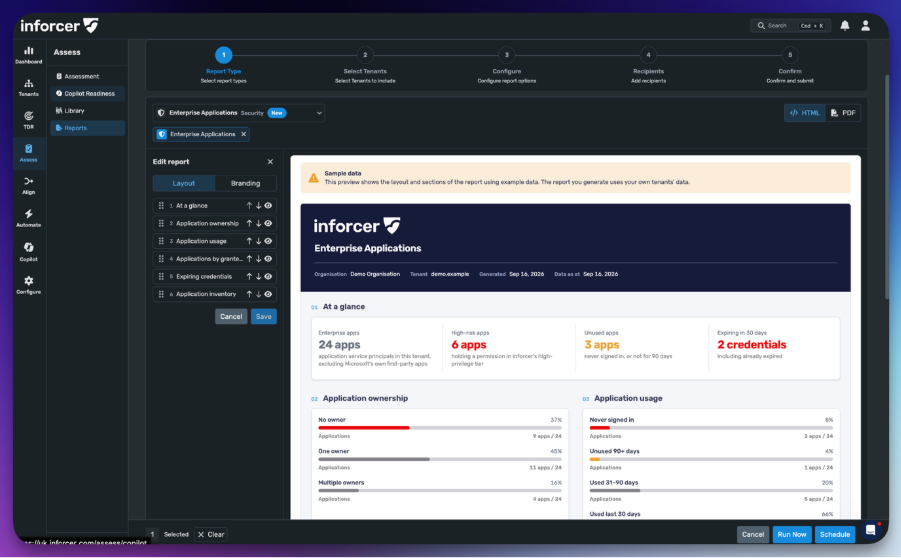
Login to inforcer and head to Assess > Reports
-
Select the ‘Enterprise Applications’ report
- Run for all tenants and send to a trusted email address for review (via a zip file).
With KQL (Sentinel or Log Analytics)
Unexpected sign-ins by the backup app:
AADServicePrincipalSignInLogs
| where TimeGenerated > datetime(2026-10-01)
| where AppId == "506e08f9-6e9a-4da4-942b-a099a03644ae"
| where not(IPAddress startswith "fd")
| summarize FirstSeen = min(TimeGenerated), LastSeen = max(TimeGenerated), SignIns = count()
by IPAddress, ServicePrincipalId, ResourceDisplayName, ResultType
Role assignments made by apps rather than people:
AuditLogs
| where TimeGenerated > datetime(2026-09-01)
| where OperationName == "Add member to role"
| extend ByAppId = tostring(InitiatedBy.app.appId), ByApp = tostring(InitiatedBy.app.displayName)
| where isnotempty(ByAppId)
| project TimeGenerated, ByApp, ByAppId, Target = tostring(TargetResources[0].displayName),
Changes = TargetResources[0].modifiedProperties
If you collect logs from many tenants in one workspace, look for one app touching many tenants in a short window:
AADServicePrincipalSignInLogs
| where TimeGenerated > ago(30d)
| where not(IPAddress startswith "fd")
| summarize Tenants = dcount(TenantId), FirstSeen = min(TimeGenerated), LastSeen = max(TimeGenerated)
by AppId, ServicePrincipalName, IPAddress, bin(TimeGenerated, 1h)
| where Tenants >= 5
If you have Microsoft Graph activity logs turned on, this shows what was requested from the server's address:
MicrosoftGraphActivityLogs
| where TimeGenerated > datetime(2026-10-01)
| where IPAddress == "144.172.64.128"
| summarize Requests = count(), FirstSeen = min(TimeGenerated), LastSeen = max(TimeGenerated)
by AppId, UserAgent, RequestMethod, ResponseStatusCode
What to do now
-
Disable ConnectWise Cloud Backup in every tenant where it's installed. If customers rely on it, disable rather than delete it, so it can be switched back on later. If they don't, remove it.
-
Remove the other SkyKick and ConnectWise apps you don't use. The app IDs are in the indicators table below.
-
Review role assignments held by apps, especially Exchange Administrator, and remove anything you didn't expect.
-
Export sign-in and audit logs covering 1–16 October before retention runs out. Note, if you’re a TDR customer you can use the logs shown in inforcer TDR.
-
Turn on Microsoft Graph activity logs, so next time you can see what an app actually read.
-
Don't re-enable the app until ConnectWise confirms the credential has been rotated.
Longer term
-
Keep an inventory of every third-party app in every tenant, with its last sign-in date. Anything unused for 90 days should need a reason to stay.
-
When you offboard a vendor, remove its apps from every customer tenant as part of the process, and ask the vendor to remove those tenants on its side too.
-
Restrict user consent and require admin approval for new apps.
-
Treat vendor apps as identities. Watch their sign-ins for addresses outside the vendor's normal ranges, and for one app touching many tenants in a short window.
Indicators
|
Type |
Value |
Notes |
|
IP address |
144.172.64[.]128 |
RouterHosting LLC (AS14956), geolocated to Sydney. App-only sign-ins, 06:53–08:44 UTC on 15 October 2026. |
|
IP address |
fde4:8dba:2600:37ce: 6d26:200:a76::/112 |
Private Azure range used by ConnectWise Cloud Management apps. Source of app-only sign-ins, 01:06–02:10 UTC on 15 October 2026, and the sign-ins before the Exchange Administrator self-grants. Also carries legitimate ConnectWise traffic, so use it to correlate activity rather than to block or alert on its own. |
|
App ID |
506e08f9-6e9a-4da4-942b-a099a03644ae |
ConnectWise Cloud Backup. Shown as SkyKick Backup in older tenants. |
|
App ID |
b78f6a77-d4e5-46fb-87e5-d1648bd02519 |
Cloud Management - Exchange Online (SkyKick Cloud Manager). Added itself to Exchange Administrator, 02:02–02:08 UTC on 15 October. |
|
App ID |
24205314-2b89-4e07-a2a4-579e898a5640 |
Cloud Management - MS Teams. Overnight token requests, 01:07–01:51 UTC on 15 October. |
|
App ID |
b2b55f5b-7758-4719-8d8f-88ae172e6bdb |
Cloud Management - SharePoint Online. Overnight token requests, 01:59–02:10 UTC on 15 October. |
|
App ID |
c921256f-04a7-44e8-9b2a-69c33929ba19 |
Cloud Services Partner Portal (SkyKick Partner Portal). Token requests, 20:09–20:17 UTC on 14 October. |
|
App ID |
0de14c77-b9b0-4137-9360-34878a929827 |
Cloud Management - MS Graph. Role assignments outside PIM in one tenant on 10 September. |
|
Publisher tenant |
3f9cd7a0-127a-4ed4-bf06-2f830d5616b7 |
ConnectWise S-K LLC. Every app above is published from this tenant. |
|
User agents |
Python-urllib/3.12, python-requests/2.31 |
Reported by other security teams in Graph activity logs. We haven't observed these ourselves. |
What we still don't know
-
How the app's credential, or the ability to use it, came to be used outside the vendor's infrastructure.
-
Whether the overnight activity and the role assignments were the attacker or a vendor process.
-
Who was behind the July and September waves.
-
What, if anything, was read with the tokens that had access.
-
How far the list went beyond the tenants we can see. The sweep we saw stopped part-way through the tenant-ID range, and it may have continued for tenants outside our view.
-
What potential lateral movement might still occur as part of the ongoing attack.
We'll update this post as ConnectWise shares more. If you've found something in your own tenants that adds to the picture, we'd like to hear from you. The more of us compare notes, the faster everyone gets a complete answer.
Share this

AI-Powered, Human Controlled: The SOC Is Evolving
Microsoft Intune: Roots and Solutions It Brings to the Table