Summary
Many Microsoft 365 breaches stay invisible because each step resembles normal activity: an attacker phishes a session token, replays it to bypass MFA, sets up a hidden mailbox rule to keep access, then waits within the tenant until its time to strike. Because Microsoft 365 logs can lag and do not put these signals into context, many MSPs use external threat detection and response solutions like inforcer TDR to protect customers by correlating data across each tenant environment.
|
Time to read |
|
|
What you’ll learn |
|
|
Next steps |
|
|
Benefits for MSPs |
|
Versioned Specifics
-
Article originally published: July 28, 2026
-
Key problems addressed: session token theft that bypasses MFA; hidden mailbox rules and OAuth consents; attackers waiting undetected for weeks; Microsoft 365 log delays
-
Relevant inforcer solution: inforcer TDR working with 365 Manager
-
Important dates: September 2026: inforcer TDR generally available
Scope and Limitation Statement
inforcer TDR correlates events such as sign-ins, mailbox rules, app consents, and device registrations within each tenant, using the configuration posture 365 Manager established to judge what's normal. It detects and contains attacks inside Microsoft 365 and identifies the weakness exploited. It doesn't stop a user from clicking a phishing link, and it doesn't replace security awareness training or payment verification checks.
Anatomy of an Invisible Microsoft 365 Breach
When most business owners picture a data breach, they imagine something dramatic: usually locked screens with ransom notes, or alarms going off. But the Microsoft 365 breaches that do the most damage tend to be silent, because nothing the threat actor does actually resembles an attack. Each step looks like normal activity, and the intruder may have been inside the tenant for weeks before anyone notices.
Understanding how these breaches actually unfold at each step is the best way to understand how to stop them. Below, the team behind inforcer TDR shows you how to discover and stop a Microsoft 365 breach faster by connecting signals that may each appear harmless on their own.
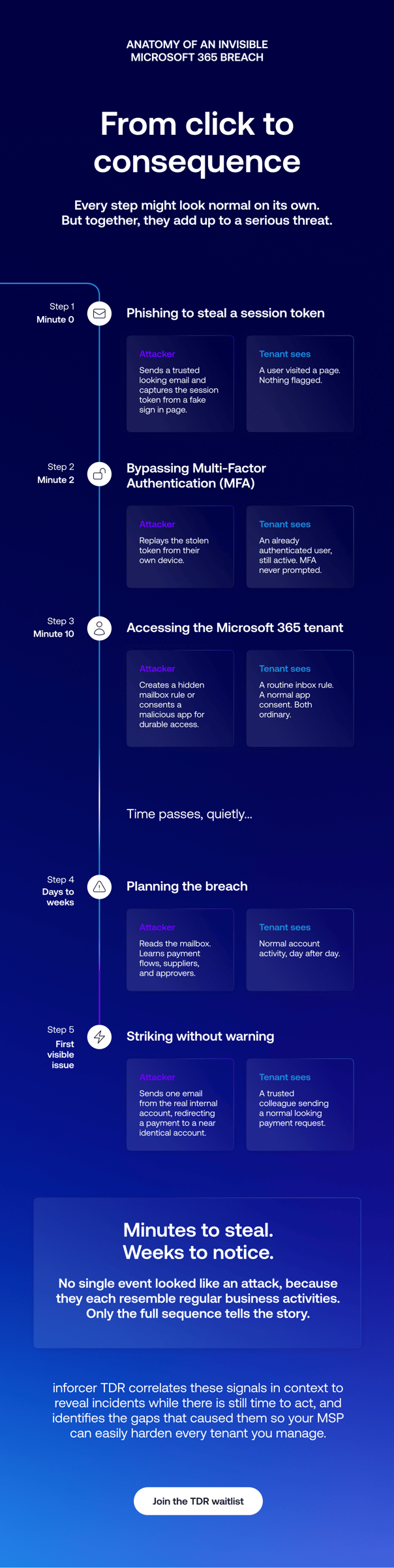
Step one: the click no one thinks twice about
An invisible Microsoft 365 attack usually begins by using a phishing scam to target a finance director, or someone else with access to money and the authority to move it:
- They receive an email that looks entirely legitimate, often from a sender the business already trusts.
- The link in that email leads to a sign-in page that looks exactly like Microsoft's.
- They click, and may even enter their credentials.
- And then, from their point of view… nothing happens. The page stalls, or redirects to a real document, or throws a generic error. No harm done, as far as the user can tell.
But behind that stalled page, an attacker has just captured what they came for. In many modern attacks, they’re not just after the password; they’re also trying to obtain the live session token.
A live session token is the credential Microsoft 365 issues to prove a user has already authenticated. With it, the attacker doesn't need to break in. They can access the tenant as the user, on their own device, and the tenant will treat them as legitimate.
Step two: walking past the front door
Here's where a well-managed tenant's defenses should, in theory, kick in. Multi-factor authentication exists precisely to stop an attacker who has a stolen password.
But a stolen session token sidesteps MFA entirely, because the token already represents a completed login. The tenant isn't being asked to authenticate a new sign-in; it's being shown proof that authentication already happened.
From the system's perspective, nothing is wrong. The user who logged in this morning is simply still active.
At this stage, the breach is genuinely invisible: no failed logins, no MFA prompts denied, no policy violated. Every preventive control did exactly what it was configured to do, and the attacker is inside anyway.
Step three: setting up quietly
An attacker who has walked in on a borrowed session knows that session won't last forever. So the next move is to establish quieter, more durable access, and to do it in ways that generate no obvious signals.
Two techniques are especially common:
A hidden mailbox rule
The attacker creates an inbox rule on the compromised account, often one that immediately deletes or files away incoming messages matching certain criteria.
If they intend to use the account to send phishing messages to others, they also create a rule that quietly deletes all incoming mail. This keeps replies and warnings out of the real user's sight, so the victim never notices their account is being used against their own contacts.
Creating a mailbox rule is a completely ordinary action that thousands of legitimate users take every day, which is exactly why it doesn't stand out.
A consented app
Alternatively, the attacker may grant access to an OAuth application that looks legitimate. Because app consent is a normal part of how people extend Microsoft 365 permissions, this hands the attacker standing access to mailboxes or files that persists even if the stolen session dies or the password is later reset.
Either way, the attacker now has a foothold that doesn't depend on the original break-in, and they’ve done nothing so far that looks like an incident on its own.
Step four: the long, quiet wait
This is the part that surprises people. A financially motivated attacker often doesn't strike right away. They wait.
Sitting inside a compromised mailbox is an intelligence-gathering exercise. The attacker reads. They learn details like:
- How the business talks about money
- Who approves payments
- Which suppliers are on the books
- What a normal invoice looks like
- When large transfers usually happen
They may even register a new device to the account to make their continued access look routine while they watch for the right moment. That patience is what allows the attack to eventually pay off.
When the threat actor finally acts, it's often not a crude smash-and-grab. It's a single email, sent from a real, trusted internal account, at a plausible moment, asking for a payment to go to an account with details changed just slightly from the legitimate ones. Because it comes from inside, from a person the recipient knows, it clears the instinctive checks that would normally catch a phishing email, and the money moves. It’s only once the damage has been done that anyone notices something was wrong.
Not every attacker wants money, though. Some are pure disruptors who are in it to delete mailboxes, wipe files, and cause as much damage as possible. But whether the goal is theft or destruction, the pattern of getting in and staying hidden until they can strike is fundamentally the same.
Why each step slips through
Step back and look at the whole chain of events described above:
Phishing for token theft → stolen token for MFA bypass → setting up a mailbox rule or app consent → quiet lateral movement until data access
The reason these individual steps can escape notice, even within a well-managed tenant, is that no single step is anomalous by itself. They only spell trouble when you can see them in sequence.
A user clicking a link is normal. A session token being used is normal. A mailbox rule being created is normal. An app being granted consent is normal. A device being registered is normal. A trusted internal user sending an email about a payment is the most normal thing in the world.
Preventive controls evaluate events one at a time against specific policies. And one at a time, against policy, every one of these events passes. The attack only becomes visible as a story, when you line the events up and see that the same account that received a suspicious login also created a deletion rule, registered a new device, and started moving files, all within a window that doesn't fit that user's normal behavior.
No single frame shows the crime. You can only see it by looking at the big picture.
The detection gap: minutes to steal, weeks to notice
Visibility isn’t the only challenge MSPs face when trying to detect these attacks. The timing matters just as much.
Microsoft 365 audit and sign-in logs don't always populate in real time. Depending on the workload and log type, there can be a meaningful delay between an action happening and that action becoming visible in the logs an investigator would review.
For an attacker, that lag is an opportunity: data can be accessed and exfiltrated in minutes, while the evidence of it may not surface until much later.
In most tenants, no one is watching those logs continuously. An admin could find the trail by looking for it, but they'd have to know to look for it first. Without a tool actively flagging the behavior, the first things an MSP typically notices are downstream and seemingly innocuous, like a mailbox rule that doesn't look right or a spike in file downloads. If you don't have context-specific controls that would, for example, block or flag a sign-in from Germany at 2am against a user who's never left the state, it can be weeks or months before anyone connects the dots.
Remember: data only takes moments to steal, but an invisible attack can take weeks or months to notice without the right tooling in place. Fortunately, there is a way to solve this problem.
Correlating threat signals across Microsoft 365 environments
inforcer has spent years providing MSPs with deeper visibility into Microsoft 365 environments through our award-winning multi-tenant management platform. Watching how attacks played out across more than 50,000 tenants and 1,200 partners is what brought the problem into focus for our team: even secure, well-run tenants can be targeted through the everyday activity they are required to permit.
We realized the best way to solve this problem was by building a threat detection and response tool designed to integrate with the same platform our MSP partners use to secure their tenants. The resulting product, named inforcer TDR, accomplishes two things a bolt-on tool cannot achieve:
- It has context for each configuration it's defending. inforcer TDR is able to read each tenant's known configuration posture, because that posture was established within inforcer’s multi-tenant management platform (now known as 365 Manager) in the first place. This allows it to recognize events that likely represent real incidents without creating an overwhelming number of false positives in the process.
- It closes the loop back to prevention. When inforcer TDR surfaces an incident, it can also identify the policy or configuration weakness the attacker exploited. The MSP can then remediate the root cause across every affected tenant through 365 Manager, strengthening all tenants against future attacks of the same type.
Using deep Microsoft telemetry to enhance security with inforcer TDR
inforcer has spent years developing deep visibility into Microsoft 365 environments through our multi-tenant management platform, now known as 365 Manager. Watching how attacks played out across more than 50,000 tenants and 1,200 partners showed us that even well-managed tenants have the potential to be compromised through activity that appears normal when taken out of context.
We built inforcer TDR to help MSPs see the story these events tell together:
- It correlates signals across each tenant. inforcer TDR uses deep Microsoft telemetry to reveal the relationships between seemingly unrelated events that may all be part of a single breach.
- It knows each tenant's configuration. Because inforcer TDR reads the known configuration posture that 365 Manager established, it can distinguish normal behavior for a given customer from a pattern of suspicious activity. That context helps prevent unnecessary alerts for routine activity that could otherwise fatigue or distract IT personnel.
- It closes the loop back to prevention. Each time inforcer TDR surfaces an incident, it also identifies the policy or configuration weakness the attacker exploited. The MSP can then remediate that root cause across every affected tenant through 365 Manager, hardening the whole estate against the next attempt.
An invisible breach stays invisible only as long as no one connects the pieces. Connecting the pieces quickly and in context is the solution inforcer TDR provides.
There’s no such thing as an invisible breach with the right TDR solution
The uncomfortable truth about Microsoft 365 breaches is that the most costly ones don't look like breaches while they're happening. They look like a normal Tuesday, right up until the money's gone or the files are deleted.
Defending a tenant means being able to see the whole story rather than individual events. Management and prevention keep a tenant secure and productive, but detection and response provide a way to remediate incidents when a bad actor finds a way to exploit the access intended for your customer and their users.
inforcer TDR is coming soon, adding threat detection and response to the multi-tenant management platform MSPs already trust to secure Microsoft 365 at scale. Join the inforcer TDR waitlist for a sneak peek at product features, exclusive demos and webinars, and the chance to be among the first to experience end-to-end Microsoft 365 security coverage.
Frequently Asked Questions
What makes a Microsoft 365 breach "invisible"?
An invisible breach is one where every individual step looks like normal activity, so nothing triggers an alarm. Events like a stolen session token used to sign in, a new mailbox rule, an app being granted consent, or a file download, are all ordinary events on their own. The attack only becomes visible when those events are connected as a sequence, which preventive controls that judge events one at a time aren't designed to do.
How do attackers access Microsoft 365 environments without triggering MFA?
One common method is stealing a live session token rather than just a password. The token represents an already-completed login, so when the attacker replays it, the tenant sees an authenticated user rather than a new sign-in that needs a second factor. MFA is never prompted because, as far as the system is concerned, the authentication already happened.
Why do threat actors sometimes wait weeks before triggering a breach?
Financially motivated attackers often use that time to gather intelligence. By quietly reading a compromised mailbox, they learn who approves payments, which suppliers are involved, and what a normal transaction looks like. That lets them eventually send a single convincing email, from a real internal account, redirecting a payment, which is far more likely to succeed than an immediate, obvious attack.
Is reviewing Microsoft 365 logs enough to catch every data breach?
No, reviewing Microsoft 365 logs is generally not enough to catch invisible data breaches for two reasons. First, Microsoft 365 logs can lag, so an action may not appear in the reviewable record until hours after it happened, while data can be stolen in minutes. Second, most tenants have no one watching those logs continuously. The evidence is usually there, but without a tool actively flagging and correlating the behavior, someone would have to know to go looking, and by then the breach may be weeks old.
How does inforcer TDR help MPSs detect an invisible Microsoft 365 attack?
inforcer TDR focuses on contextual behavior: factors that aren't suspicious individually but become concerning next to each other. It uses deep Microsoft telemetry to correlate signals across every layer of Microsoft 365 and weigh them against each tenant's known configuration. This means individual events like a login, a mailbox rule, a device registration, and a burst of file activity on the same account surface together as part of the same suspicious pattern of behaviour rather than as separate alerts that may be ignored.
Will inforcer TDR replace 365 Manager?
No, these are separate but complementary solutions from inforcer. 365 Manager remains inforcer's multi-tenant management platform for hardening, baselines, and drift remediation. inforcer TDR adds threat detection and response as optional capabilities, so MSPs get prevention and protection in one connected system rather than relying on disconnected tools.
Share this
Live demo with Co-founder,
Will Connor
Want to see inforcer in action? Join a live platform demo with inforcer Co-founder and Chief Community Officer, Will Connor to explore how inforcer could benefit you.


.png)
Prevention vs. Protection: Why Both Are Vital to Modern MSPs

The MSP’s Guide to Selling Microsoft 365 Security to Skeptical Customers