Summary
Microsoft 365 Copilot inherits a tenant's existing security and data governance posture, so turning it on surfaces problems like overshared SharePoint sites or guest accounts in privileged groups rather than creating new ones. inforcer's Copilot Readiness Assessment audits a tenant's identity, device, and security configuration and returns a go or pause decision, while inforcer's Purview DLP enforcement pushes data loss prevention policy across every connected tenant from one console. Together they let an MSP decide which clients are ready before rollout, not after an incident.
|
What you'll Learn |
|
|
Benefits for MSPs |
|
|
Required Next Steps |
|
Versioned specifics
- Copilot Readiness Assessment audits Microsoft 365 identity configuration, device security posture, and security settings, and returns an exportable report with a readiness score, remediation steps, and a first-wave rollout plan
- Purview DLP enforcement deploys centrally across every connected tenant, blocking sensitive data leaving trusted domains plus unauthorized external sharing, printing, copying, and uploads
- Microsoft 365 Copilot requires a qualifying base license: Business Standard, Business Premium, or Microsoft 365 E3 or E5, with Copilot sold as a paid add-on
- Microsoft 365 E7 (Frontier Suite), generally available since May 1, 2026 at $99/user, includes Copilot natively with no separate add-on
- Copilot also requires a Microsoft Entra ID account and a primary Exchange Online mailbox; shared, delegate, group, and archive mailboxes are not supported
- Both capabilities are shipped and in production today, first published November 10, 2025 by Matthé Smit, Chief Product Officer at inforcer
Scope and Limitation Statement
inforcer's Copilot Readiness Assessment audits a Microsoft 365 tenant's identity, device, and security configuration and reports whether it is ready for Copilot, plus a suggested first wave of users. Its Purview DLP enforcement pushes data loss prevention policy across every connected tenant from one console. It does not purchase or assign Copilot licenses, build custom retention or labeling schemes from scratch, or replace ongoing adoption monitoring, which is handled separately by inforcer's Copilot Manager product once Copilot is live.
Copilot Readiness Assessment and Purview Data Loss Prevention
Every MSP is currently hearing the same question: "What's our AI strategy?"
Here's what most MSPs are missing: AI is already inside your customers' businesses. 75% of employees already use AI at work. Among SMBs, 80% bring their own AI tools, meaning the risk of Shadow AI is higher than ever. Waiting to discuss AI with customers and begin roll out doesn't reduce risk; it pushes the risk outside of your control.
But the other extreme is equally dangerous: when customers request Copilot without business cases, pilots can launch without direction, and their IT investment can be wasted.
AI roll out should be as strategic as it is secure. inforcer’s Copilot Readiness Assessment and Purview Data Loss Prevention solve both problems, allowing you to identify customers who will gain real value from Copilot and ensure that roll out is monitored, secure, and effective.
Why does Copilot readiness matter?
Copilot inherits a business’ current security model. If identity management is weak, sharing is unrestricted, and data governance is loose, Copilot will surface whatever the tenant already allows.
Just imagine your customers’ environments… that overshared SharePoint site from 2019, the guest account in a high-privilege group, the unprotected file sync on a non-compliant laptop - Copilot makes them all easier to find. Great for productivity, catastrophic without boundaries.
As an MSP, it’s your job to ensure that those boundaries are in place and are always properly enforced.
The traditional approach doesn't scale
Without the right tools at their disposal, senior engineers are currently having to jump between portals, spreadsheets, and half-documented standards to answer five key Copilot readiness questions:
1. Is the tenant secure enough?2. Are users and devices ready?
3. How is data managed and protected?
4. Who gets Copilot first?
5. What problems will this solve, and how do we measure ROI?
This manual approach is exhausting and error-prone. Translating findings into a business-ready rollout plan is nearly impossible.
A better approach
Our new feature release helps MSPs position themselves as strategic Copilot leaders. We’re providing the tools you need to eliminate manual back-and-forth, easily assess customers’ AI maturity, and ensure adoption is seamless and secure.
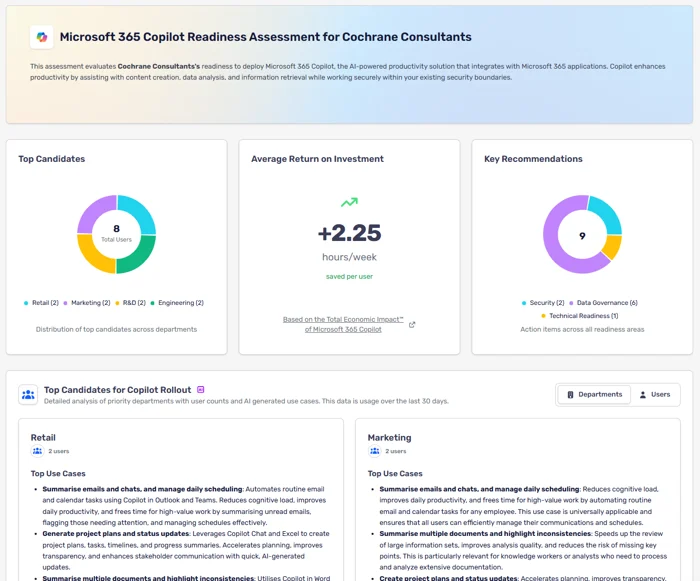
inforcer Copilot Readiness Assessment
inforcer's Copilot Readiness Assessment allows MSPs to gauge their customers' maturity for Copilot adoption and take the next steps towards improving readiness.
We analyze Microsoft 365 identity, device posture, and security configuration to determine readiness instantly. You get clear recommendations mapped to specific gaps and usage analysis that identifies which power users and departments should receive Copilot first, matched to proven use cases.
The outcome: A confident go/no-go decision, the fixes needed to reach "go," and a first-wave rollout plan tied to value.
Purview Data Loss Prevention enforced
inforcer now supports Purview Data Loss Prevention (DLP) policies with Purview-specific deployment options, meaning you can:
- Prevent sensitive data from leaving trusted domains.
- Block external sharing, printing, copying, and uploads to unauthorized apps.
- Identify, monitor, and automatically protect sensitive data, ensuring compliance with regulatory requirements and internal governance standards.
- Deploy and monitor DLP policies centrally across tenants.
The outcome: Copilot surfaces what matters without expanding your customers’ attack surface.
What does this mean for MSPs?
AI is hot topic in the space at the moment, but MSPs have been faced with more questions than answers. We want to help you turn Copilot from a challenge into an opportunity. With our new features, you can take charge of AI conversations with customers and position yourself as a confident leader in the AI space.
- Productized delivery. Assessments run in seconds. Every engagement is consistent.
- Unlock new revenue streams. Make Copilot the basis of a new managed service, with readiness reviews, hardening engagements, governance baselines, ongoing posture tracking, DLP tuning, and phased Copilot expansion.
- Confident positioning. You're not guessing. You know which customers are ready for roll out, what needs fixing, and where Copilot can deliver immediate value.
The path forward
Customers want AI outcomes. Infrastructure and governance allow you to deliver them safely.
Assess. Harden. Govern. Roll out where value lands first.
That's how you ship Copilot without shipping risk.

FAQs
What is Microsoft 365 Copilot readiness, and why does it matter?
Copilot readiness means a tenant's identity, device, and data governance controls are solid enough that turning Copilot on will not surface files or permissions that should already be locked down. Copilot inherits whatever security posture already exists, so problems like overshared SharePoint sites or guest accounts sitting in privileged groups become easier for a user to find, not harder, once it goes live.
What does inforcer's Copilot Readiness Assessment actually check?
It audits a tenant's Microsoft 365 identity configuration, device security posture, and general security settings against what Copilot needs to run safely. It also flags power users and departments by usage pattern, matches gaps to documented use cases, and returns a go or pause decision plus a first-phase rollout plan tied to business value.
What license does a client need to turn on Microsoft 365 Copilot?
Copilot is sold as a paid add-on to a qualifying base plan, including Business Standard, Business Premium, or Microsoft 365 E3 and E5. Microsoft 365 E7, generally available since May 2026, includes Copilot natively with no add-on required. Users also need a Microsoft Entra ID account and a primary Exchange Online mailbox; shared and delegate mailboxes are not supported.
How does inforcer enforce Purview DLP for Copilot across many tenants at once?
inforcer applies Microsoft Purview DLP policy centrally, then pushes it across every connected tenant instead of configuring each one by hand. Policies block sensitive data leaving trusted domains and stop external sharing, printing, copying, and uploads to unapproved apps, so every client sits under the same governance standard regardless of tenant count.
Does Copilot actually increase the risk of oversharing in Microsoft 365?
Yes, if identity and sharing controls are already loose. Copilot does not create new vulnerabilities, but it makes existing ones, like overshared SharePoint sites or guest accounts sitting in privileged groups, far easier for a user to surface. That is why inforcer treats a readiness assessment as the step before rollout, not an afterthought.
What is the difference between inforcer's Copilot Readiness Assessment and Copilot Manager?
The Readiness Assessment is a pre-rollout check: it audits identity, device, and data governance posture and returns a go or pause decision before Copilot is switched on. Copilot Manager is a separate inforcer product for after rollout: it tracks license utilization, adoption scores, and shadow AI risk across a client base. Run the assessment first, then use Copilot Manager on an ongoing basis.
Share this

How to Assess Microsoft Copilot Readiness as an MSP

Copilot Cowork is here, but what is it?